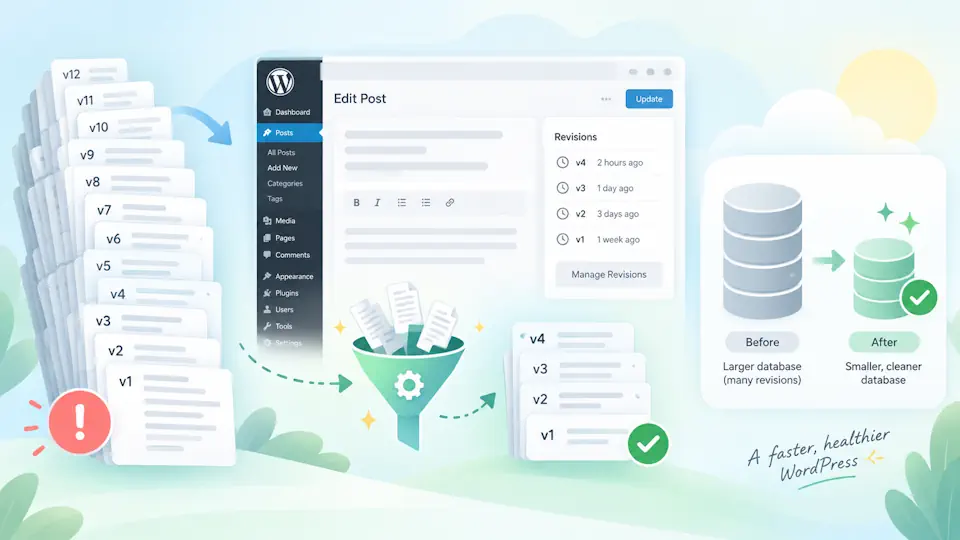
WordPress revisions are useful because they let editors recover earlier versions of posts and pages, but on long-lived websites they can also create unnecessary database growth when every content update is stored indefinitely.
For most sites, the goal should not be to remove revisions completely. A better approach is to keep a reasonable number of recent revisions, preserve normal editorial recovery, and prevent old content histories from growing without limit.
This guide explains how WordPress revisions work, how to limit them safely, when it makes sense to disable them, how revisions affect the database, and how to clean up old revisions without damaging useful content history.
What are WordPress revisions?
WordPress revisions are saved versions of posts, pages and other supported post types. When you update content, WordPress can keep previous versions so you can compare changes or restore an earlier copy.
Revisions are especially useful when:
- Multiple people edit the same site.
- Pages are updated frequently.
- You need a simple rollback option for content.
- Editors want to compare previous changes.
- Content is legally or operationally important and historical versions are useful.
The problem appears when revisions are allowed to accumulate indefinitely across hundreds or thousands of posts.
Where WordPress stores revisions
WordPress stores revisions in the main posts table, typically wp_posts, using the revision post type. Each revision is linked to its parent post or page.
Related metadata can also exist in wp_postmeta, depending on the content type, editor and plugins in use.
This means revisions are not kept in a separate archive table. They become part of the same database structure used by normal WordPress content.
Do revisions slow down WordPress?
Revisions can contribute to database size, but the performance impact depends on the site.
On a small site with a few dozen pages, revision growth is usually not a serious concern. On a large editorial site, WooCommerce installation or long-running business website with many content updates, the revision count can become significant.
Potential effects include:
- Larger database backups.
- Longer database exports and migrations.
- More storage usage.
- More rows for maintenance and cleanup tools to process.
- Potentially slower administrative database operations on very large sites.
Revisions are rarely the only cause of a slow WordPress site, but they are a reasonable database-maintenance target when the revision count is unnecessarily high.
Should you disable WordPress revisions completely?
Usually, no.
Completely disabling revisions removes a useful recovery mechanism. If an editor overwrites content accidentally or a page is changed incorrectly, there may be no easy previous version to restore.
For most production websites, limiting revisions is safer than disabling them entirely.
| Approach | Advantages | Disadvantages |
|---|---|---|
| Unlimited revisions | Maximum editorial history | Database can grow indefinitely |
| Limited revisions | Good balance between recovery and database size | Very old versions are eventually removed |
| Disabled revisions | Minimum revision storage | No standard revision history for content recovery |
For many Managed WordPress sites, keeping between 5 and 20 revisions per post is a practical compromise.
How to limit WordPress revisions with wp-config.php
The most direct method is to define WP_POST_REVISIONS in wp-config.php.
For example, to keep a maximum of 10 revisions per post:
define('WP_POST_REVISIONS', 10);Add the constant before the line:
/* That's all, stop editing! Happy publishing. */After this change, WordPress keeps only the configured number of revisions for each supported post.
Examples of WP_POST_REVISIONS values
| Setting | Behavior |
|---|---|
define('WP_POST_REVISIONS', 20); | Keeps up to 20 revisions per post |
define('WP_POST_REVISIONS', 10); | Keeps up to 10 revisions per post |
define('WP_POST_REVISIONS', 5); | Keeps up to 5 revisions per post |
define('WP_POST_REVISIONS', false); | Disables post revisions |
| Constant not defined | WordPress keeps revisions according to default behavior |
For most business websites, 5 or 10 is enough to preserve useful rollback history without allowing uncontrolled growth.
Does limiting revisions delete old revisions immediately?
No. Changing WP_POST_REVISIONS controls how revisions are kept going forward, but it does not automatically clean all historical revisions already stored in the database.
If the site already contains thousands of old revisions, you may need a separate cleanup step.
How to remove old WordPress revisions safely
Before deleting revisions, create a full backup of the database.
There are several safe approaches:
- Use a trusted database optimization plugin.
- Use WP-CLI if you manage the server directly.
- Run carefully tested SQL queries on a staging copy first.
- Use a hosting control panel or managed maintenance workflow.
For most production sites, plugin or WP-CLI cleanup is safer than running ad-hoc SQL directly in phpMyAdmin.
Cleaning revisions with WP-CLI
If WP-CLI is available, revisions can be listed and removed from the command line.
For example, you can identify revision IDs with:
wp post list --post_type=revision --format=idsThen delete them using:
wp post delete $(wp post list --post_type=revision --format=ids) --forceUse this only when you are certain that removing all historical revisions is appropriate.
On larger sites, it is better to process records in smaller batches rather than deleting a very large number of rows in one command.
Cleaning revisions with SQL
Direct SQL is possible, but it should be handled carefully because revisions can have related metadata.
A simple revision query is:
SELECT ID, post_parent, post_date
FROM wp_posts
WHERE post_type = 'revision';
Do not blindly delete rows from production without understanding the relationships and without taking a backup first.
Database cleanup tools are generally preferable because they can remove related metadata and handle table maintenance more safely.
WordPress autosave vs revisions
Autosave and revisions are related, but they are not exactly the same thing.
Autosave protects work while an editor is actively writing. WordPress periodically saves a temporary version so a browser crash or interrupted connection is less likely to destroy recent changes.
Revisions preserve historical versions after content is saved.
| Feature | Purpose |
|---|---|
| Autosave | Protects work during an editing session |
| Revisions | Stores previous saved versions for comparison and recovery |
Limiting revisions does not mean you should disable autosave.
Can you change the autosave interval?
Yes. WordPress uses the AUTOSAVE_INTERVAL constant to control the autosave interval in seconds.
For example:
define('AUTOSAVE_INTERVAL', 120);This changes the interval to two minutes.
There is usually little reason to make autosave dramatically slower just to reduce database writes. For most sites, revision limiting provides a cleaner way to control long-term database growth.
How many revisions should WordPress keep?
The ideal number depends on the site's workflow.
| Site type | Suggested starting point |
|---|---|
| Small business website | 5 to 10 revisions |
| Agency-managed website | 10 revisions |
| Editorial blog | 10 to 20 revisions |
| Large publisher | 20+ depending on editorial policy |
| Staging or temporary environment | Low limit may be acceptable |
There is no benefit in setting the number arbitrarily low if editors regularly rely on revision history.
Do page builders create more revisions?
They can.
Page builders such as Elementor, Gutenberg-based block editors and other visual editing tools may generate revisions as users save layout changes repeatedly.
On sites where designers edit pages intensively, revisions can accumulate quickly.
This is one reason database maintenance matters more on agency-built or managed WordPress websites than on simple blogs with occasional updates.
Revisions and WooCommerce
WooCommerce uses WordPress post types for many types of content, and extensions may also create records that contribute to database growth.
Revision limiting can still be useful, but avoid treating WooCommerce database optimization as only a revision problem.
Large WooCommerce sites can also accumulate:
- Order-related records.
- Session data.
- Action Scheduler records.
- Expired transients.
- Post metadata.
- Plugin-specific logs.
A complete optimization strategy should evaluate all of these areas rather than focusing exclusively on revisions.
Revisions and database backup size
One of the most visible benefits of revision cleanup is smaller database backups.
If a site has thousands of pages and each page has dozens of revisions, the number of rows in wp_posts can become much larger than the number of actual published posts.
This can increase:
- SQL export size.
- Backup duration.
- Migration time.
- Restore time.
- Storage consumption.
For managed hosting environments where backups run daily, database hygiene can have a meaningful operational benefit.
How to check how many revisions your site has
You can inspect the number of revisions with SQL:
SELECT COUNT(*)
FROM wp_posts
WHERE post_type = 'revision';
If your database uses a custom table prefix, replace wp_posts with the correct table name.
You can also check the size distribution of post types:
SELECT post_type, COUNT(*) AS total
FROM wp_posts
GROUP BY post_type
ORDER BY total DESC;
This provides useful context before you decide whether revision cleanup is actually worthwhile.
Should you optimize database tables after deleting revisions?
Sometimes.
Deleting many rows does not always immediately reduce the physical table size. Depending on the database engine and hosting environment, table optimization can reclaim free space or reorganize data.
However, table optimization should not be run blindly on a busy production database. On larger sites, it can consume resources and temporarily lock or rebuild tables depending on the database version and engine.
For managed environments, perform cleanup and optimization during low-traffic periods or through the hosting platform's recommended maintenance process.
How revisions fit into WordPress performance optimization
Revision cleanup is useful, but it is only one part of WordPress performance work.
A broader optimization plan should also review:
- Page caching.
- Browser caching.
- CDN configuration.
- Image optimization.
- PHP and database performance.
- Unused plugins.
- Autoloaded options.
- Object caching.
- Background jobs and cron activity.
For related performance topics, read our best WordPress caching plugins, browser caching guide and WordPress CDN guide.
Managed WordPress recommendation
For Managed WordPress environments, revision limits should be standardized rather than configured randomly per site.
A reasonable policy is:
- Keep 5 to 10 revisions for normal business sites.
- Use a higher limit for editorial teams that actively depend on revision history.
- Do not disable revisions globally unless the site has a clear reason.
- Clean historical revisions during scheduled database maintenance.
- Back up the database before cleanup.
- Review database growth periodically instead of waiting for it to become a migration or backup problem.
This gives clients useful recovery while avoiding unnecessary long-term database growth.
Common mistakes when limiting WordPress revisions
- Disabling revisions without understanding the editorial impact. Editors lose an important recovery mechanism.
- Assuming a new revision limit deletes old revisions immediately. Existing rows remain until cleaned.
- Running DELETE statements without a backup. Direct database changes should always be recoverable.
- Confusing autosave with revision history. They solve different problems.
- Optimizing tables during peak traffic. Maintenance operations can consume database resources.
- Expecting revision cleanup to fix every performance issue. Large autoload data, plugins or slow queries may be more important.
Frequently asked questions about WordPress revisions
How do I limit WordPress revisions?
Add the WP_POST_REVISIONS constant to wp-config.php. For example, define('WP_POST_REVISIONS', 10); keeps up to 10 revisions per post.
What is a good revision limit for WordPress?
Five to ten revisions is a good starting point for many business sites. Editorial websites may prefer a higher number.
Can I completely disable WordPress revisions?
Yes, by setting WP_POST_REVISIONS to false. However, this removes standard content rollback history and is usually not recommended for production sites.
Will limiting revisions speed up WordPress?
It can reduce database growth and make backups, migrations and maintenance easier, but revision limiting alone usually does not produce a dramatic frontend speed improvement.
Does changing WP_POST_REVISIONS remove existing revisions?
No. The setting controls revision retention going forward. Existing historical revisions need to be cleaned separately.
Are revisions stored in wp_posts?
Yes. Revisions are stored in the WordPress posts table using the revision post type and are linked to their parent content.
Should I delete all revisions?
Only if you are comfortable losing all previous content versions. A safer strategy is usually to keep a small number of recent revisions and remove older ones.
Conclusion
Limiting WordPress revisions is a simple database-maintenance improvement that can prevent unnecessary growth without sacrificing the benefits of content history.
For most production websites, the best approach is to keep a sensible number of revisions rather than disable them completely. A limit of around 5 to 10 revisions works well for many business sites, while editorial teams may need more.
Combine revision limits with periodic database cleanup, backups and broader WordPress performance maintenance. Revisions are only one part of database health, but controlling them is an easy way to keep long-running WordPress installations cleaner and easier to manage.