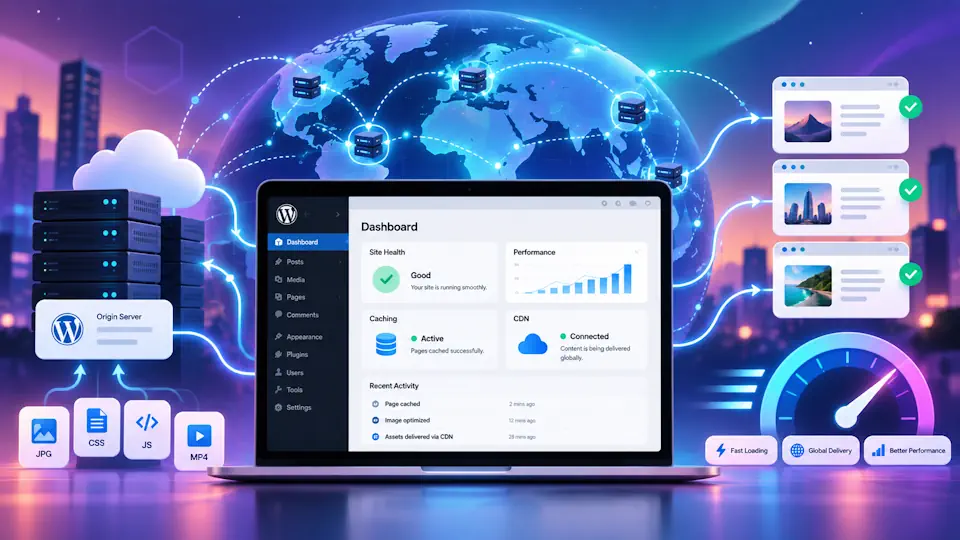
A content delivery network, usually called a CDN, can be one of the most effective ways to improve WordPress performance at scale. Instead of serving every static asset directly from the origin server, a CDN distributes content through a network of geographically dispersed edge locations so visitors can download files from a location closer to them.
For WordPress sites, that can mean faster asset delivery, lower origin-server load, more stable performance during traffic spikes and a better experience for visitors outside the data center region where the website is hosted.
This guide explains what a CDN does for WordPress, when it makes sense to use one, how it interacts with caching plugins and browser caching, the differences between pull zones and reverse-proxy CDNs, and how to choose a practical setup for brochure sites, blogs, WooCommerce stores and managed WordPress environments.
What is a CDN for WordPress?
A CDN is a distributed delivery layer that stores and serves cacheable website resources through multiple edge locations rather than requiring every request to travel to the origin server.
On a WordPress site, a CDN often serves assets such as:
- Images and generated thumbnail sizes.
- CSS files from the theme or optimization pipeline.
- JavaScript files from WordPress, themes and plugins.
- Web fonts.
- Icons, SVG files and other static media.
- Sometimes HTML pages, depending on the CDN and caching strategy.
The basic idea is simple: if a visitor in Germany, Romania or the United States can fetch site resources from a nearby edge node instead of a single distant origin server, the overall experience can become faster and more resilient.
How a CDN works with WordPress
Without a CDN, the browser requests files directly from the hosting server. With a CDN in front of some or all resources, the request first reaches the CDN edge. If the edge already has a valid cached copy, it serves the asset immediately. If not, it requests the resource from the origin, stores it according to the cache policy and then serves it to the visitor.
| Step | Without a CDN | With a CDN |
|---|---|---|
| 1 | Browser requests a file from the origin server | Browser requests a file from the CDN edge |
| 2 | Origin server processes and serves it | CDN edge serves a cached copy or fetches it from the origin |
| 3 | Every distant visitor depends directly on origin latency | Later visitors can often be served from the nearest edge location |
| 4 | Origin handles more repeated traffic | Origin load can be reduced for cacheable assets or pages |
This architecture is especially useful for global audiences, media-heavy pages and websites that receive bursts of traffic from external articles, social media or campaigns.
Why use a CDN on a WordPress site?
A CDN is not only about raw speed scores. It can support several practical goals at the same time:
- Reduce latency for visitors far from the origin server.
- Serve static files more efficiently.
- Lower bandwidth and repeated asset requests at the origin.
- Absorb traffic spikes more gracefully.
- Improve caching consistency across global traffic.
- Support image optimization, edge compression and security features depending on the provider.
- Complement managed WordPress performance architecture.
For managed WordPress services, a CDN often fits naturally alongside page caching, browser caching, image optimization and server-level tuning. It is not a replacement for good hosting, but it can amplify a well-configured stack.
Does every WordPress site need a CDN?
No. A CDN is useful, but it is not mandatory for every site.
If a WordPress site is small, lightweight and serves a mostly local audience near the hosting region, the performance gains may be modest. On the other hand, a CDN becomes much more attractive when one or more of the following are true:
- The audience is spread across multiple countries or continents.
- The site uses many images or downloadable assets.
- The origin server is far from a large part of the audience.
- The site experiences traffic spikes.
- The site runs WooCommerce or another resource-intensive stack and you want to reduce unnecessary asset delivery from the origin.
- You want a stronger managed performance architecture with edge caching and asset delivery.
It is also important to be realistic: a CDN will not fix poor origin performance, oversized plugins, slow PHP execution or an overloaded database. Those problems still need to be addressed directly.
CDN vs browser caching vs page caching
These concepts are related, but they are not the same.
| Layer | What it does | Typical scope |
|---|---|---|
| Browser caching | Stores assets on the visitor's device for reuse | CSS, JS, fonts, images and other static files |
| Page caching | Stores generated HTML so WordPress does not rebuild every page request | HTML responses |
| CDN caching | Stores content at edge locations closer to users | Static assets and sometimes HTML pages |
These layers often work together. A user may load a page from a CDN edge, receive static files that are themselves cached by the browser and benefit from an origin that also uses server or plugin-based page caching.
To understand the browser side better, read our guide to leverage browser caching in WordPress. For the page-cache layer, continue with our best WordPress caching plugins comparison.
Types of CDN setups for WordPress
Not every CDN works in the same way. For WordPress, two broad models are especially common.
1. Static asset CDN or pull zone
In this model, the CDN mainly serves files such as images, CSS, JavaScript and fonts. The origin remains responsible for generating HTML pages.
This approach is common when:
- You use a CDN hostname such as
cdn.example.com. - Your caching plugin rewrites static asset URLs to the CDN domain.
- You want a simpler setup focused on media and frontend assets.
The model is straightforward and often lower risk for dynamic sites.
2. Reverse-proxy CDN in front of the whole site
In this model, traffic reaches the CDN before it reaches the origin server. The CDN may cache static resources, protect the origin, provide WAF or rate limiting features and sometimes cache full HTML pages at the edge.
This model is common when:
- You proxy the entire domain through a service such as Cloudflare or a similar edge platform.
- You want DNS, edge security and caching in one layer.
- You may later add edge page caching or image optimization.
For managed WordPress performance, a reverse-proxy model can be very powerful, but it requires careful cache rules for logged-in sessions, WooCommerce and personalized pages.
What content should a WordPress CDN cache?
The safest and most common starting point is static content.
- Images.
- Generated image sizes.
- Theme CSS.
- Plugin and theme JavaScript.
- Font files.
- Icons and static downloadable media.
Depending on the provider and site architecture, you may also cache HTML pages at the edge. This can be highly effective for content sites, but not every page should be cached in the same way.
Examples of pages that need more careful treatment include:
- Logged-in user areas.
- WooCommerce cart and checkout.
- Customer account pages.
- Search results.
- Pages personalized by cookies, location or user state.
A strong CDN strategy is not “cache everything forever.” It is “cache what is safely reusable, and bypass or purge what must remain dynamic.”
Benefits of a CDN for managed WordPress
A managed WordPress service is often expected to provide more than basic hosting. Clients usually care about uptime, security, updates and performance, but they also want that performance to remain stable as the site grows. A CDN supports that goal well.
Within a managed WordPress context, a CDN can help with:
- Faster asset delivery for international traffic.
- Reduced origin load, which leaves server resources for PHP and database work.
- Better resilience during traffic spikes from campaigns or viral posts.
- Cleaner separation between dynamic application work and edge delivery.
- A stronger base for image optimization and browser-caching policies.
- Operational consistency when multiple client sites share similar performance standards.
That is why /cdn-for-wordpress/ is such a strong semantic fit for a managed WordPress and performance-focused website. It supports the larger topic of how hosting architecture and optimization layers work together.
Common CDN use cases for WordPress
| Site type | Why a CDN may help | Notes |
|---|---|---|
| Business presentation site | Faster asset delivery and lower latency for broader audiences | Often simple to implement |
| Blog or magazine | Images and cacheable pages benefit strongly | Useful for traffic spikes from search or social |
| WooCommerce store | Static assets and category pages can improve while preserving dynamic cart/checkout behavior | Needs careful exclusion rules |
| Membership or LMS site | Public assets can be accelerated globally | User-specific content requires selective caching |
| Agency or managed WordPress portfolio | Standardizes performance delivery across multiple sites | Useful as part of a repeatable stack |
Popular CDN approaches for WordPress
There is no single best provider for every project. What matters is the fit between the website, the hosting stack and the management model.
Examples of common approaches include:
- Cloudflare-style reverse proxy: good for global edge presence, DNS integration, security layers and optional full-site caching.
- Bunny-style pull zone: attractive when you want a simple asset CDN and explicit control over pull zones, storage or additional optimizers.
- Hosting-integrated CDN: useful when a managed host already includes a supported CDN layer and you want fewer moving parts.
- Enterprise edge platforms: relevant for larger publishers or more complex application needs.
The “best” option depends less on branding and more on practical questions: who manages the rules, who purges the cache, how the CDN interacts with the host, how WooCommerce is handled, and whether the provider offers features you actually need.
How a CDN interacts with WordPress caching plugins
A CDN and a caching plugin are usually complementary, not mutually exclusive.
A WordPress performance plugin may help with:
- Page caching.
- Asset optimization and minification.
- Delay or deferral of scripts.
- Preload behavior.
- CDN URL rewriting for static files.
- Automatic cache purge when content changes.
The CDN then handles delivery from the edge.
Good integration matters. A common problem is that the origin cache is purged but the CDN keeps serving an older copy. Another is duplicated optimization across multiple layers. The cleaner approach is to define which layer owns which responsibility.
| Function | Often handled by |
|---|---|
| Generate cacheable HTML | Page cache plugin, server cache or host |
| Store static files at the edge | CDN |
| Long browser-cache headers | Server, host, plugin or CDN depending on stack |
| Purge on content update | Plugin integration, API or hosting layer |
| Dynamic page exclusions | Plugin, server rules and CDN rules together |
Should a CDN rewrite asset URLs?
Sometimes yes, sometimes no.
In a pull-zone asset CDN model, it is common to rewrite static resources from the main domain to a CDN domain such as cdn.example.com. Many WordPress plugins can help with this.
In a reverse-proxy model, the main domain often stays unchanged because the CDN sits transparently in front of the entire site. In that case, URL rewriting is not the central mechanism.
Both approaches can work. What matters is consistency, cache purge behavior, HTTPS support and whether the setup is easy to maintain.
CDN and Core Web Vitals
A CDN can help Core Web Vitals, but it is not a direct guarantee.
- LCP: can improve if the largest image or required CSS is delivered faster.
- INP: may improve indirectly when overall page load is lighter, but JavaScript execution and UI responsiveness still matter more.
- CLS: is mostly unrelated to the CDN itself and depends more on layout stability, dimensions and rendering behavior.
If the real bottleneck is oversized JavaScript, unoptimized images, too many third-party scripts or a slow origin generating HTML, the CDN alone will not solve the issue. It should be part of a broader performance plan.
CDN and image optimization
Many WordPress sites gain substantial value when a CDN also supports image delivery improvements. Depending on the provider, those features may include:
- Automatic compression.
- Format negotiation such as WebP or AVIF delivery.
- Resizing or transformation at the edge.
- Global caching of optimized variants.
This can be especially useful on image-heavy WordPress sites such as blogs, service sites with galleries and WooCommerce stores. However, if you already optimize images locally or through a separate plugin, make sure the workflows do not conflict unnecessarily.
CDN and WordPress security
Some CDN providers also offer security features such as DDoS mitigation, rate limiting, bot controls or a web application firewall. These can be valuable, but they should be understood as additional perimeter controls rather than a substitute for WordPress security hygiene.
You still need:
- Timely updates.
- Good account security.
- Reliable backups.
- Application hardening and monitoring.
- Careful plugin and theme selection.
The CDN can add resilience, but it should sit within a broader managed WordPress operating model.
How to set up a CDN for WordPress
The implementation path depends on the CDN type, but a practical process is usually:
- Decide whether you want an asset CDN or a reverse-proxy CDN.
- Identify which parts of the site should be cached at the edge.
- Make sure your origin already has sensible page caching and browser-cache rules.
- Enable the CDN and connect the domain or pull zone.
- Configure cache rules, exclusions and purge behavior.
- Test desktop, mobile and logged-in behavior.
- Verify WooCommerce or membership-specific flows if applicable.
- Measure before and after using real requests, not only synthetic assumptions.
If you use a CDN as part of a managed WordPress service, document the chosen architecture clearly so future troubleshooting is easier.
How to test whether a CDN is working
You can verify a CDN with several methods:
- Inspect response headers for CDN-specific metadata or cache-status values.
- Check whether asset requests resolve through the CDN domain or proxied main domain.
- Use browser developer tools to review TTFB, transfer size and caching behavior.
- Run speed tests from multiple geographic regions.
- Review whether cache purges take effect after content changes.
A successful CDN implementation is not only about seeing a vendor-specific header. It is about confirming that the delivery path, caching behavior and update workflow all function correctly.
WooCommerce and CDN considerations
WooCommerce can benefit greatly from a CDN, but only if the dynamic parts are handled carefully.
Good candidates for CDN acceleration include:
- Product images.
- Theme and plugin assets.
- Public category pages, depending on cache rules.
- Static JavaScript and CSS used across the storefront.
Pages that usually need bypass or careful handling include:
- Cart.
- Checkout.
- My Account.
- Pages with user-specific pricing or session-based content.
The goal is not to avoid CDNs on WooCommerce. The goal is to cache reusable assets aggressively while preserving correct transactional behavior.
Common CDN mistakes on WordPress sites
- Using a CDN before fixing origin performance. A CDN helps delivery, but it does not repair a slow application stack.
- Not defining cache ownership. Multiple layers may cache the same thing with unclear purge behavior.
- Caching dynamic pages carelessly. This can break carts, accounts or logged-in behavior.
- Ignoring purge workflows. Updated content may not appear immediately if the edge cache is not purged.
- Duplicating optimization across plugins and CDN layers. Extra complexity can create conflicts without adding much value.
- Assuming a CDN is only for static assets. Some providers can do much more, but only if configured appropriately.
- Assuming a CDN alone is enough. Image optimization, page caching, browser caching and code quality still matter.
A practical CDN strategy for WordPress
For many sites, a sensible and low-risk strategy is:
- Start with a clean origin: solid hosting, page caching and optimized images.
- Use long browser-cache lifetimes for versioned static assets.
- Add a CDN for static files first.
- If needed, expand into reverse-proxy or edge page caching later.
- Define exclusions for dynamic routes and user-specific content.
- Automate or simplify cache purge behavior.
- Measure performance in the regions that actually matter for your audience.
This sequence tends to produce better long-term results than enabling many aggressive layers at once without understanding how they interact.
Frequently asked questions about using a CDN with WordPress
What is the best CDN for WordPress?
There is no universal best CDN for every WordPress site. The right option depends on your hosting stack, audience geography, budget, management preferences and whether you want simple asset delivery or a full reverse-proxy setup.
Does a CDN make WordPress faster?
Usually yes for cacheable assets, especially when visitors are geographically far from the origin or when the site serves many images and static resources. The gains are often more noticeable for global audiences than for users near the server.
Can a CDN replace a WordPress caching plugin?
Not completely. A CDN can deliver content from edge locations, but WordPress often still benefits from page caching, asset optimization or cache-purge integrations provided by plugins, the server or the host.
Is a CDN useful for local traffic only?
It can still help with offloading assets and smoothing traffic spikes, but the performance gains may be smaller if most users are already very close to the origin server.
Should I use a CDN on WooCommerce?
Yes, often. Product images and static storefront assets are excellent CDN candidates. You simply need to exclude or handle dynamic pages such as cart, checkout and account areas correctly.
Can a CDN improve SEO?
Indirectly, yes. Faster asset delivery, better user experience and improved stability can support technical SEO and performance goals, but a CDN is only one part of a larger optimization strategy.
Do I need a separate CDN domain for WordPress?
Not always. Separate CDN hostnames are common for pull-zone setups. In reverse-proxy models, the main domain often remains unchanged because the CDN sits in front of the whole site.
How do I know if the CDN cache is serving content?
Inspect response headers, vendor cache-status values and request paths in browser developer tools or command-line tests. You should also confirm that changes purge correctly when you update content or assets.
Conclusion
A CDN can be a highly effective performance layer for WordPress when it is deployed with clear expectations. It can reduce latency, offload static delivery, improve resilience during traffic spikes and strengthen the architecture of a managed WordPress stack.
The biggest gains usually come when the CDN complements, rather than replaces, the rest of the performance foundation: good hosting, efficient page caching, strong browser-cache rules, optimized images and sensible plugin choices.
If you are building a faster WordPress stack, use this guide together with our best WordPress caching plugins article and our browser caching guide so the delivery layers work together instead of in isolation.